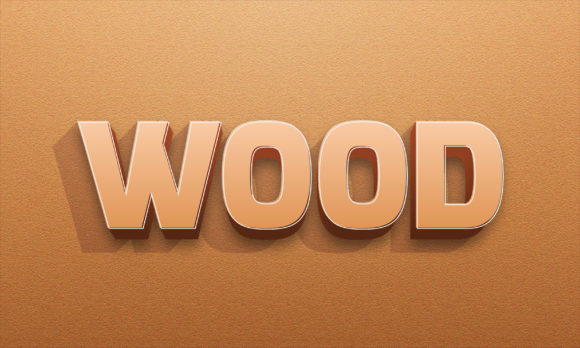
Wood 3d Text Effect: Bringing Natural Warmth to Your Creative Projects
In a digital landscape often dominated by sleek, metallic, and neon aesthetics, there is something undeniably grounding about the texture of wood. It evokes feelings of craftsmanship, history, and organic warmth. The Wood 3d Text Effect bridges the gap between traditional design elements and modern digital typography, offering a versatile tool for creators who want their messages to stand out with character and depth. This isn't just about making text look like it was carved from a tree; it is about injecting a sense of tangible reality into flat designs.
Whether you are a graphic designer looking to elevate a brand identity or a small business owner needing eye-catching promotional materials, this editable graphic element provides a practical solution. It transforms standard typography into a visual experience that feels handcrafted, adding a layer of sophistication that smooth gradients simply cannot achieve on their own.
Real-World Applications Across Industries
The versatility of this effect lies in its ability to adapt to various contexts without losing its core charm. While it might seem like a niche stylistic choice, the applications are surprisingly broad. Imagine walking through a boutique coffee shop where the menu board features names of blends in a rich, wooden finish. That immediate connection to nature and quality sets the tone before a single sip is taken. This is exactly what the Wood 3d Text Effect achieves in a digital format.
Branding and Packaging Design
For brands focusing on sustainability, organic products, or artisanal goods, the visual language of wood is powerful. A craft beer label, an eco-friendly skincare line, or a handmade furniture catalog can all benefit from this texture. When applied to a logo or product name, the effect suggests durability and authenticity. It tells the consumer that the product inside is as natural and robust as the text representing it. Because the file is fully editable, you can tweak the grain direction or the depth of the carving to match specific brand guidelines perfectly.
Event Invitations and Wedding Stationery
Rustic themes have become a staple in wedding planning and outdoor events. However, creating custom invitations that feel cohesive requires more than just a stock photo background. Using this 3D text effect allows designers to create elegant headers for "Save the Date" cards or reception programs that look like they were laser-cut from a slab of oak or walnut. The three-dimensional aspect adds a tactile quality to digital files, which translates beautifully when printed on high-quality cardstock.
Gaming and Digital Media
In the world of gaming and app development, setting the right atmosphere is crucial. For strategy games set in medieval times, survival games involving exploration, or even apps related to home improvement and woodworking, the interface needs to reflect the theme. Integrating a Wood 3d Text Effect into title screens or HUD elements can immerse the user instantly. It provides a distinct alternative to the ubiquitous glass-morphism or cyberpunk styles, offering a grounded, earthy vibe that appeals to a wide demographic.
Why Editability Matters for Modern Workflows
One of the most critical aspects of this resource is its focus on being fully editable. In the fast-paced world of creative production, receiving a locked image or a complex raster file can be a bottleneck. With this design element, you are working with a structure built for flexibility. The fact that it utilizes Adobe Illustrator CC2020 version standards means that professionals can dive straight into the vector paths without struggling with compatibility issues.
This level of control allows for rapid iteration. If a client decides they want the text to appear lighter, darker, or perhaps made of a different type of wood, the changes can be made quickly. The RGB color mode ensures that the colors remain vibrant across various digital platforms, from social media posts to website headers. You are not stuck with a static aesthetic; you are empowered to mold the text to fit the lighting and mood of your specific project.
Technical Specifications and Practical Considerations
When integrating any graphic element into a workflow, understanding the technical constraints is essential. This particular design comes in at a resolution of 2000x1200 pixels. This dimension is substantial enough for high-resolution displays and print projects that require sharpness without pixelation. However, it is important to consider how this size interacts with your final output.
For web use, scaling down the 3D text is usually seamless, but for large-scale printing, such as billboards or trade show banners, you might need to ensure that the vector scalability holds up under extreme magnification. Fortunately, since the file includes AI (Adobe Illustrator) formats, the underlying vectors should maintain their crisp edges regardless of size adjustments.
Font Compatibility
The design utilizes free fonts, which is a significant advantage for budget-conscious projects. It eliminates the risk of licensing disputes or unexpected costs later in the process. However, if you plan to modify the text content, it is wise to check that the font style complements the wood texture. A delicate script font might get lost in a heavy, rough-hewn wood effect, whereas a bold serif or sans-serif will likely carry the weight of the texture better. Experimenting with different typefaces within the editor can yield surprising results.
Maximizing the Impact of the Texture
To truly leverage the potential of the Wood 3d Text Effect, consider the environment in which it will live. Contrast is key. Placing a light-colored wood texture against a dark background can make the text pop with a glowing, ember-like quality. Conversely, a dark walnut effect on a cream background offers a classic, sophisticated look that feels timeless.
Lighting plays a role too. Since the effect is 3D, it implies a light source. Ensure that any other shadows or highlights in your composition align with the implied lighting of the text. If your background image has a shadow coming from the top left, but your 3D text appears to be lit from the bottom right, the illusion of depth will break, and the design may look disjointed.
Potential Limitations
While highly effective, the effect does come with some considerations. The complexity of the 3D shading can sometimes make the text harder to read if used at very small sizes or against busy backgrounds. It is best reserved for headlines, logos, or focal points rather than body copy. Additionally, while the file is optimized, importing it into older software versions might occasionally result in minor rendering differences, so sticking to the recommended Adobe Illustrator CC2020 version is advisable for the intended look.
Final Thoughts on Creative Integration
The journey of selecting a design asset often involves balancing aesthetic appeal with practical utility. The Wood 3d Text Effect stands out because it delivers both. It offers a rich, textured appearance that resonates with audiences seeking authenticity, while the editable nature of the file ensures it fits seamlessly into professional workflows. Whether you are crafting a rustic invitation suite, designing a game interface, or rebranding a product line, this tool provides the foundation for creating something memorable.
By understanding the strengths of the texture and respecting the technical specifications, you can transform a simple word into a visual statement. The combination of the 2000x1200 pixel dimension, the customizable RGB modes, and the ease of editing makes it a robust choice for anyone looking to add a touch of the natural world to their digital creations. It is a reminder that even in a virtual space, texture and depth can speak volumes about the quality and intent of the work behind them.